
Building a Defense Money Graph
What I learned trying to map how money actually moves through the defense ecosystem
Over the last few months, I’ve been learning the government affairs space.
Defense, in particular, has been one of the most interesting and difficult domains I’ve explored. I’ve been going deep on how money actually moves through the defense ecosystem — not in theory, but in the real world.
The world of RDT&E lines, procurement BLINs, O&M accounts, committee marks, conference outcomes, program offices, contractors, performers, acquisition offices, congressional staff, and PDFs that seem like they were designed specifically to make the job harder.
Defense data is not one dataset.
It is a scavenger hunt.
With acronyms.
Inside PDFs.
Inside other PDFs.
And every time you think you found the answer, the answer is usually: “See Exhibit P-40,” “refer to the R-2A,” or “check the committee report.”
This has been one of the hardest technical problems I’ve worked on. It has tested almost every part of the stack:
AI.
Data engineering.
Entity resolution.
Source provenance.
Graph modeling.
UX.
Workflow design.
Quality control.
And honestly… patience.
The hard part is not finding the data. Most of it is public.
The hard part is making it useful.
The problem: the data exists, but the map does not
A budget line by itself is just a number.
A committee mark by itself is just a table.
A program office by itself is just a name.
A contract award by itself is usually noise unless you know what program, capability, office, and funding line it connects to.
The value is not in any single source.
The value is in the joins.
That is what I am building with Capiro: a defense money graph.
Capability
→ requirement owner
→ RDT&E money
→ procurement money
→ O&M / sustainment
→ program office
→ contracting path
→ incumbent ecosystem
→ congressional posture
→ next move
The goal is simple: turn scattered public data into an actionable map of where defense money is, who controls it, what changed, and what to do next.
The current scale
The current system is already tracking:
- 2,380 budget lines
- FY25–FY31 funding history
- FY26 / FY27 HASC, SASC, NDAA conference, and HAC-D marks
- 15,000+ budget deltas and signals
- 1,298 program offices
- 3,364 accepted person-role relationships
- 169,596 federal award records
- Thousands of performer and company relationships
And this is still early.
What makes this difficult is not just the volume. It is the ambiguity.
The same program can appear across RDT&E, procurement, O&M, awards, committee language, and acquisition office structures — often with different names, different identifiers, different fiscal-year views, and different levels of confidence.
So the system has to do more than store rows.
It has to reconcile sources.
It has to label fuzzy joins.
It has to track confidence.
It has to preserve evidence.
It has to know when not to overclaim.
That last part matters a lot.
In defense government affairs, a wrong answer is worse than no answer.
Why this matters
I have looked hard at the market, and I have not seen anything that connects this level of defense budget, congressional, acquisition, people, performer, and award intelligence into one workflow.
After building this, I understand why.
It is painful.
It is messy.
AI helps, but AI alone is not enough. You need deterministic pipelines, source citations, data reconciliation, entity resolution, graph relationships, confidence scoring, human review, and a product experience that does not make the user feel like they are doing spreadsheet archaeology.
The reason I am excited is because this changes the user experience for defense government affairs.
Instead of asking:
“Can someone find me the right PDF?”
A user should be able to ask:
“We sell GPS-denied autonomy. Where is the money? Who owns it? What changed in Congress? Is this RDT&E, procurement, or O&M? Who are the incumbents? What is the best wedge? What should we do next?”
And the system should return something sourced, structured, and actionable.
Not a pile of documents.
Not a spreadsheet dump.
Not “good luck, check page 412.”
A real answer.
Introducing the Defense Intel Module v2
The upcoming Capiro Defense Intel Module is designed around that exact workflow.
It lets users start with a natural-language question, a capability, a company, or a program area — and move from curiosity to action.
Ask in natural language
Users can ask questions like:
“Where is the money for GPS-denied autonomy?”
or:
“Which Army robotics lines have congressional movement in FY2027?”
The module returns relevant budget line recommendations, explains why they matter, and identifies the best-fit funding path.
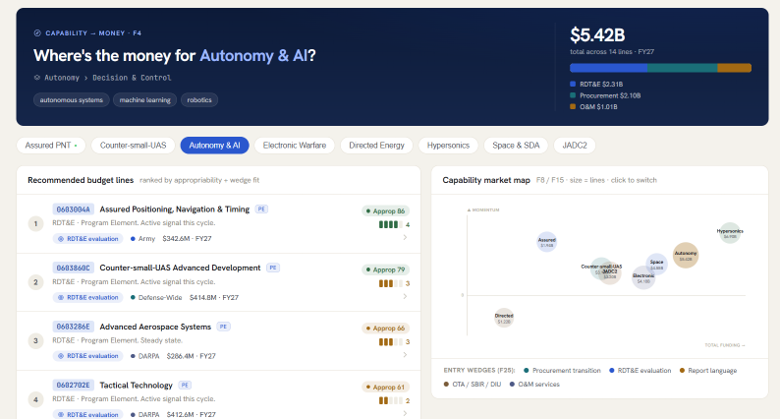
This is where the graph starts to matter. A capability does not map neatly to one budget line. It may touch RDT&E, procurement, O&M, report language, contracts, and program offices. The system is built to surface that full picture.
Track budget lines
Users can stay in the know by tracking budget lines across the appropriations lifecycle.
That means monitoring:
- President’s Budget request
- HASC marks
- SASC marks
- HAC-D marks
- Conference outcomes
- Enacted values
- Year-over-year deltas
- New starts
- Cuts
- Ramps
- Transfers
- Zeroed lines
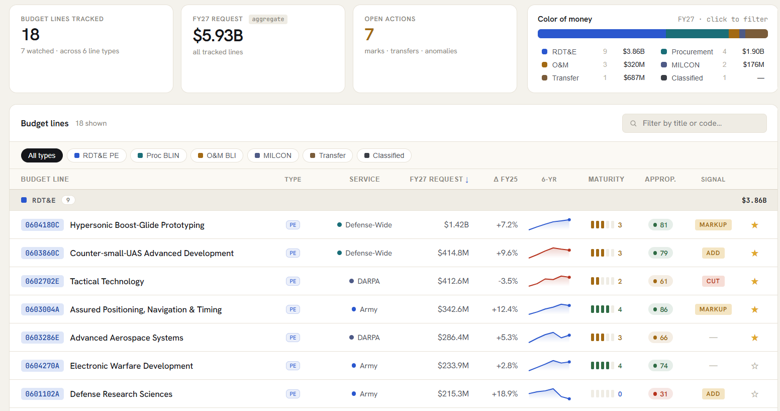
The goal is to make the budget lifecycle feel navigable.
If Congress moves a number, the user should know.
If a program gets cut in one chamber but protected in another, the user should know.
If a line is ramping across the FYDP, the user should know.
Track specific program elements
For users who already know the program elements they care about, Capiro provides a watchlist experience.
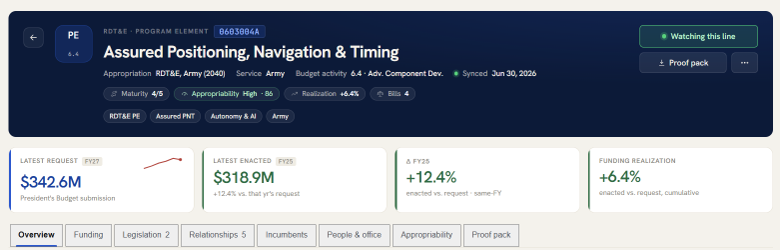
Instead of manually checking budget books and committee tables, users can follow specific PEs, procurement lines, or related funding objects.
When something changes, the system can surface the signal:
- Mark added
- Value increased
- Value decreased
- HASC / SASC divergence
- Conference opportunity
- New related award
- New related provision
- New related office or person candidate
The goal is not just to show data.
The goal is to tell the user what needs attention.
Drill into program element details
Every program element or budget line gets a detailed view.
That page answers questions like:
- What is the latest request?
- What was enacted last year?
- What did HASC do?
- What did SASC do?
- What did HAC-D do?
- Is there a conference target?
- Is the line ramping or declining?
- Is this early R&D, prototyping, procurement, or sustainment?
- Are there related procurement lines?
- Are there related O&M lines?
- Are there contractors or performers associated with it?
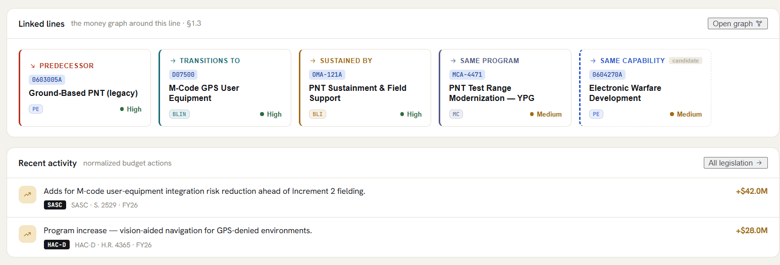
That is where Capiro starts to become less of a database and more of an intelligence layer.
Real funding analytics
Defense government affairs depends on timing.
A great opportunity in the wrong fiscal year, wrong account, or wrong color of money is not really an opportunity.
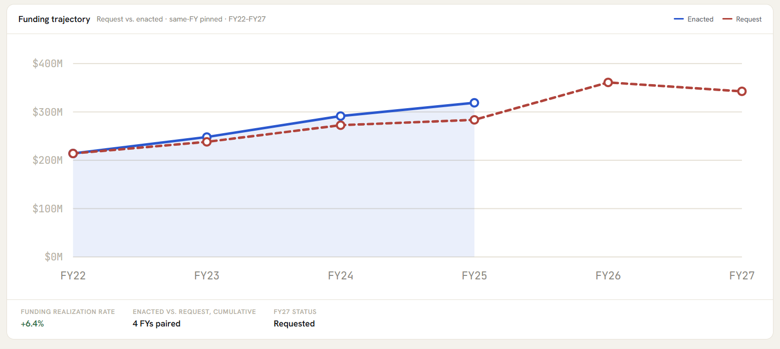
So the module looks at funding over time:
- Request vs enacted
- Committee marks vs request
- FY25–FY31 trends
- Ramps and cliffs
- Cuts and restorations
- Authorization vs appropriations divergence
- Outyear movement
- Procurement runway
- O&M sustainment signals
This helps answer a question that matters to every defense company:
“Is this a real funded path, or just a one-year blip?”
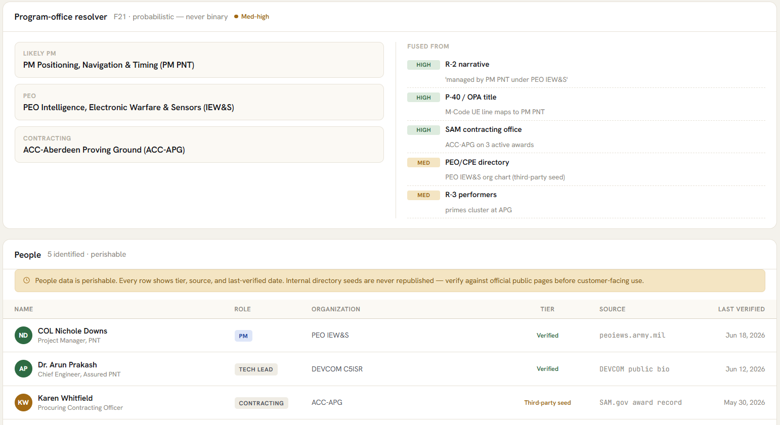
Identify ownership
Budget lines are useful, but they are only part of the story.
Users also need to know:
- Who likely owns the requirement?
- Which office is associated with the program?
- Which acquisition organization is relevant?
- Which performers are mentioned in budget justification materials?
- Which awards appear related?
- Which relationships are verified, and which are only candidates?
This is why Capiro treats relationships with confidence.
Not every office link is certain.
Not every performer is an incumbent.
Not every award cleanly maps to one PE.
The product is designed to be honest about that.
Look forward, not just backward
Most tools are good at showing what already happened.
Capiro is being built to help users understand what may happen next.
That includes:
- Where funding is ramping
- Where Congress created a restoration opportunity
- Where a program may be transitioning from RDT&E to procurement
- Where an O&M sustainment path may exist
- Where a company’s capability fits the wrong color of money
- Where an appropriations strategy may make more sense than an authorization strategy
- Where a report-language ask may be more realistic than a procurement plus-up
This is the part I think is most valuable.
The product should not just answer:
“What does the budget say?”
It should help answer:
“What should we do next?”
Build artifacts with one click
Of course, analysis is only half the job.
Government affairs teams still need to turn that analysis into work product.
So the module is being designed to generate client-ready artifacts:
- Briefing memos
- Budget line summaries
- Proof packs
- Congressional engagement notes
- Capability-to-budget maps
- Program one-pagers
- Source-backed recommendations
The goal is to reduce the time between research and action.
A user should be able to go from:
“What is the opportunity?”
to:
“Here is the sourced brief.”
in minutes, not days.
The value proposition
For government affairs teams, defense contractors, and emerging technology companies, the value is simple:
Know where the money is.
Know who controls it.
Know what Congress changed.
Know where your capability fits.
Know what to do next.
Defense government affairs should feel less like wandering a maze and more like reading a map.
That is what I am building with Capiro.